No route required
Just cruise. Rivers & Seas continuously reorders the waterway ahead.
Public beta
Boat navigation that looks ahead
As you cruise, Rivers & Seas recognizes your waterway and automatically shows what matters next: bridges, locks, closures, and vessel traffic. You do not need to enter a start or destination in a route planner first. Even with the iPhone or iPad locked, an important alert can still reach you.
For iPhone and iPad—with Apple Watch and onboard data when you want more.

Just cruise. Rivers & Seas continuously reorders the waterway ahead.
The map can be closed while important alerts appear on your iPhone or iPad.
One fixed purchase price for everything, with no recurring fees.
The difference from a conventional boat route planner
Many boat route planners reveal bridges, locks, and travel times only after you choose a start, destination, and waypoints. Rivers & Seas recognizes the waterway you are actually cruising and automatically brings forward what matters next.
Turn onto another waterway and the look-ahead turns with you.No start, destination, or waypoints are required before the app helps you underway.
Direction, position, and speed continuously determine which waterway and structures matter ahead.
See when you are likely to reach bridges, locks, closures, and vessels.
A conventional boat route planner is planned as an additional way to prepare a journey—not as a prerequisite for Rivers & Seas to help while you cruise.
Discover automatic boat navigationYou have a Track
Rivers & Seas checks the Track against cruising speed, lock duration, lock opening times, and gauge or tide predictions. You can see when to set off so the important places along the journey work together.
Expected arrival is compared with available opening times, with earlier lockages already included for later places.
Gauge level or tide and your boat height determine whether the passage is expected to fit.
Several calculable places are combined into one departure window.

Try the map and AIS for yourself
Move around the real Rivers & Seas map and discover available AIS targets directly on the water. Use the round map button to switch between the bright map, automatic day-and-night map, Seascape with water depths, and satellite imagery. OpenSeaMap navigation marks remain visible.
Tap a place to mark it and share it as a link.
Set off without checking everything first
This is look-ahead navigation that genuinely takes work off your hands. Set off spontaneously, pocket the iPhone, and Rivers & Seas looks along the waterway in the background. Before you reach a closed lock or a bridge that will not fit, the important message can already be on your Lock Screen.
Know early when a closure or opening time means that the lock will not be available when you arrive.
A known insufficient clearance can appear as a clear alert on the Lock Screen of an iPhone or iPad.
Relevant oncoming AIS traffic can reach you while the phone stays in your pocket.
When the timing fits, the alert can show the speed for arriving with a vessel ahead.

Waterway ahead
While you cruise, Rivers & Seas recognizes the waterway and automatically puts the next bridges, locks, notices, and vessels in the right order. The view keeps updating with your position, direction, and speed.
See the crossing ahead early, with a photo and the available clearance at your arrival where data allows.
Opening times, closures, VHF, and telephone details appear before you reach them.
Understand commercial traffic, ferries, and oncoming vessels in the context of the waterway.
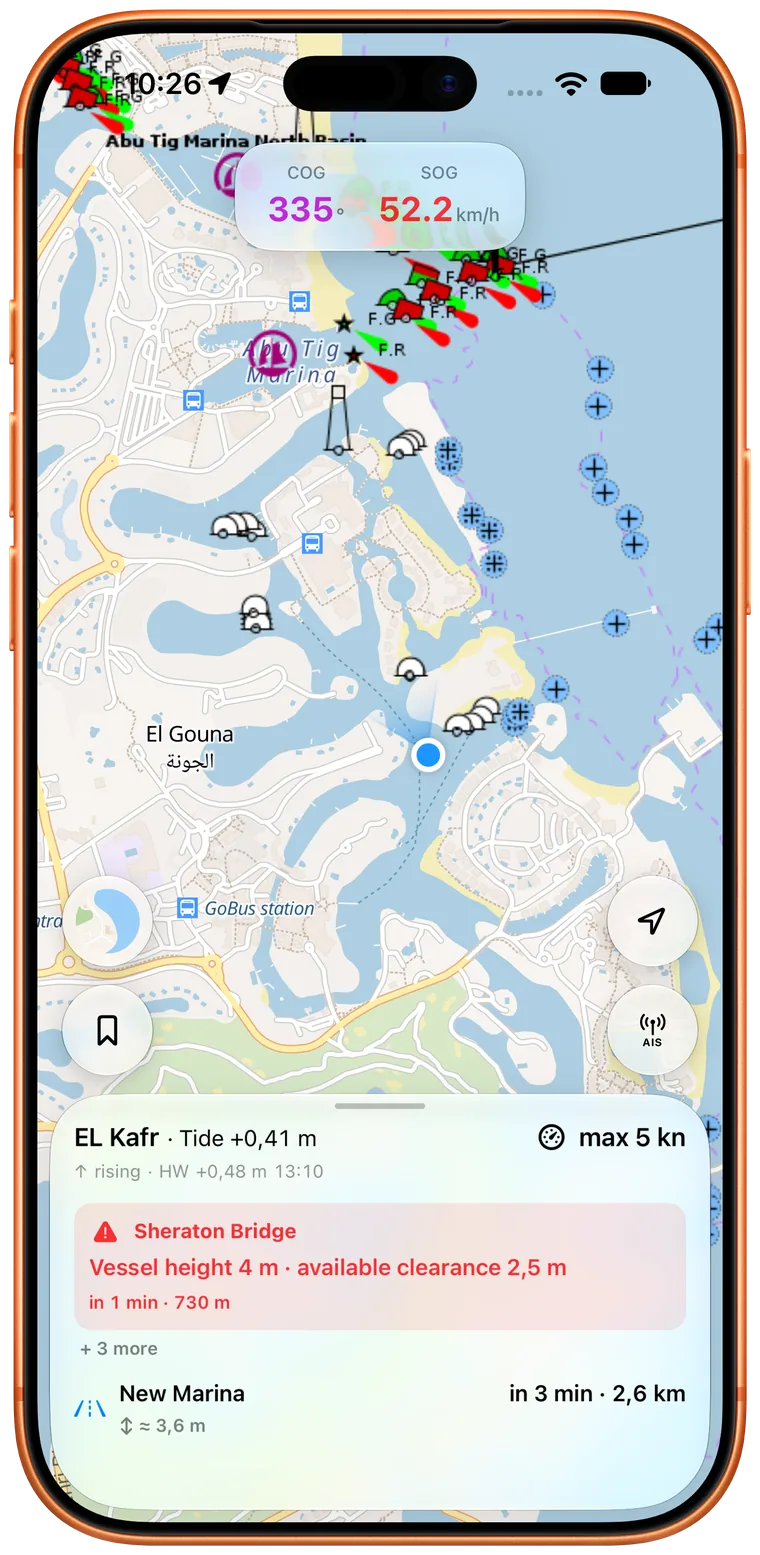
Not at some point. At your arrival.
A static bridge height or opening time tells only half the story. Rivers & Seas relates your boat, current speed, gauge levels and tides, and available notices to the journey ahead, then explains what that means in plain language.
Warnings use your saved boat dimensions and, where available, the expected water level at arrival.
Operating times and closures are interpreted for your estimated arrival.
VHF and telephone details are ready before the bridge or lock needs your full attention.
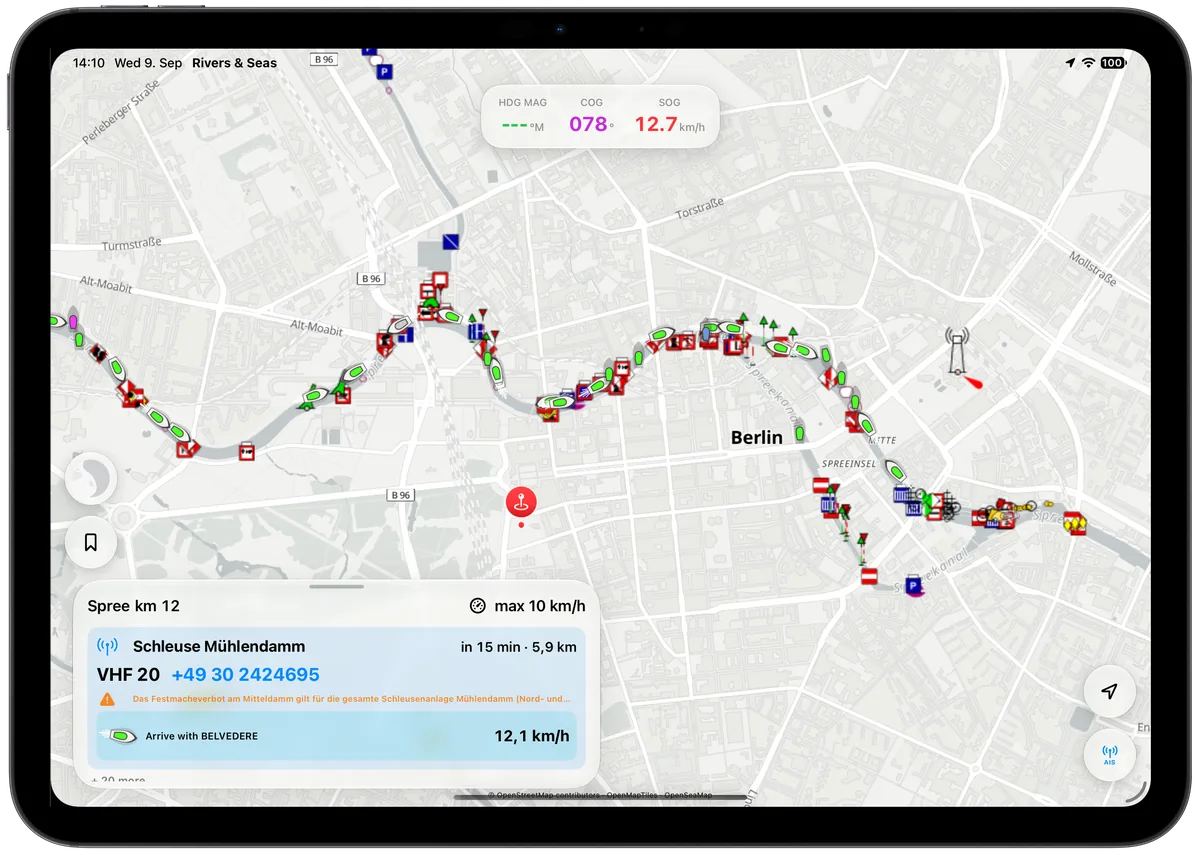
A commercial vessel ahead could save a lock cycle
Rivers & Seas compares the commercial vessel’s arrival with your own. At the lock, you see the vessel, contact details, and the speed that would bring you there together.
See the distinctive lock featureAIS that explains the situation
Rivers & Seas brings online AIS and vessels from your own receiver together on one map. On known waterways, it becomes more than a field of targets: you can understand oncoming traffic, a crossing ferry, or a large vessel ahead in time.
Discover AIS and ship radar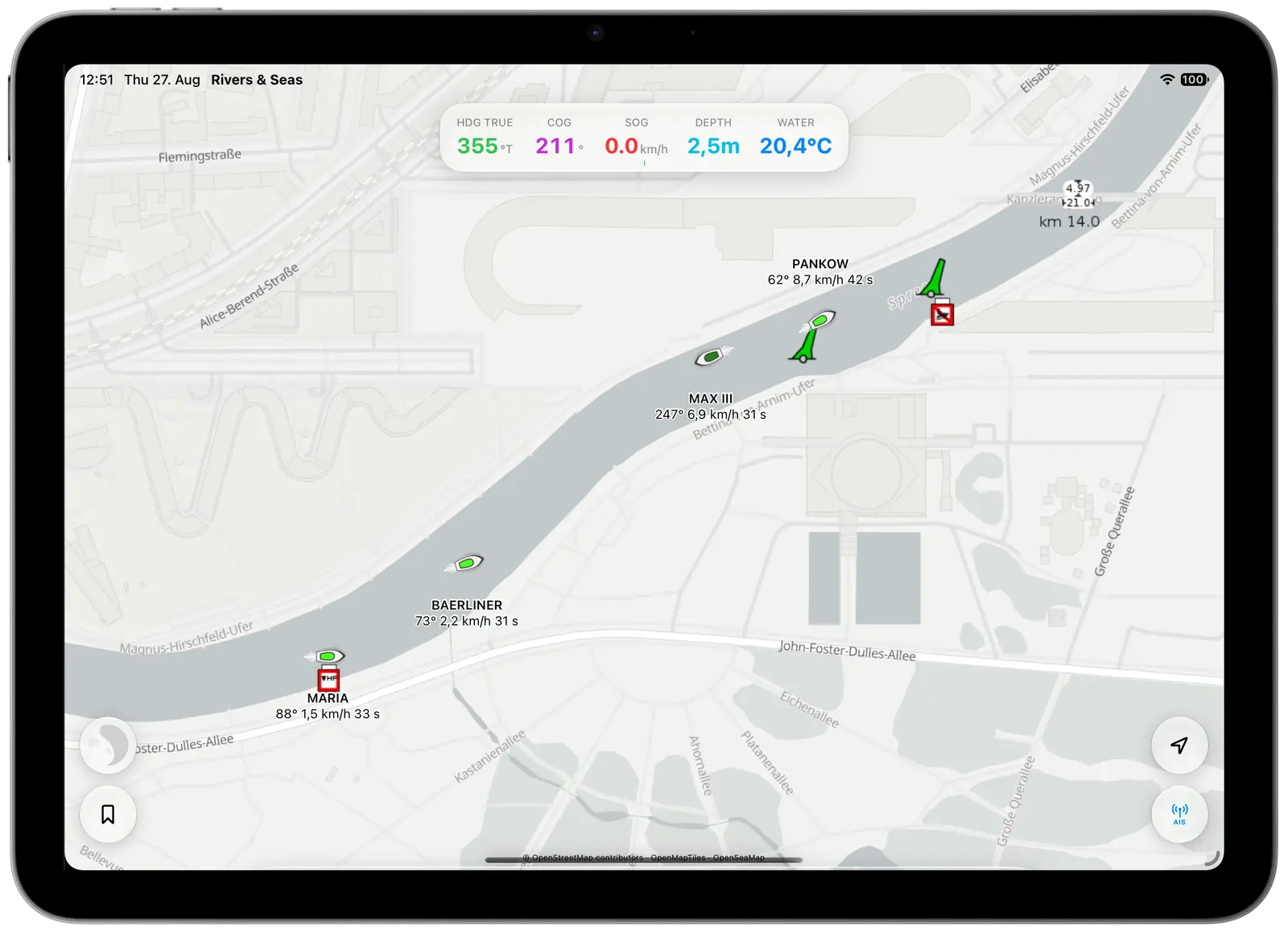
Inland and coastal in one app
Along the coast, satellite imagery, OpenSeaMap marks, and depth shading work together. Inland, bridges, locks, notices, and traffic ahead take centre stage. Your places and boat data stay with you everywhere.
Navigation marks and depth shading without the browser feel.
Explore nautical chartsSand, seagrass, and nautical context in one view.
See the satellite mapReturn to anchorages and discoveries from your last trip.
Put photos on the mapStrong where you actually cruise
Rivers & Seas offers a worldwide boating map. Particularly rich Waterway Ahead information is being built for Berlin and Potsdam, the Mecklenburg Lake District, German rivers and canals, the Netherlands, and France.
No recurring bill on board
The public beta is free. The finished app is planned at one fixed purchase price for every feature and cruising area, with no monthly or annual fees.
When you want to connect more
Use an iPhone as the GPS for a Wi-Fi iPad, display Signal K data from the onboard network, or control a compatible autopilot from your Apple devices. Rivers & Seas remains a complete navigation app without onboard electronics.
Experience it yourself
Install the free public beta on iPhone and iPad—or try the map with AIS directly in your browser first.