What you gain straight away
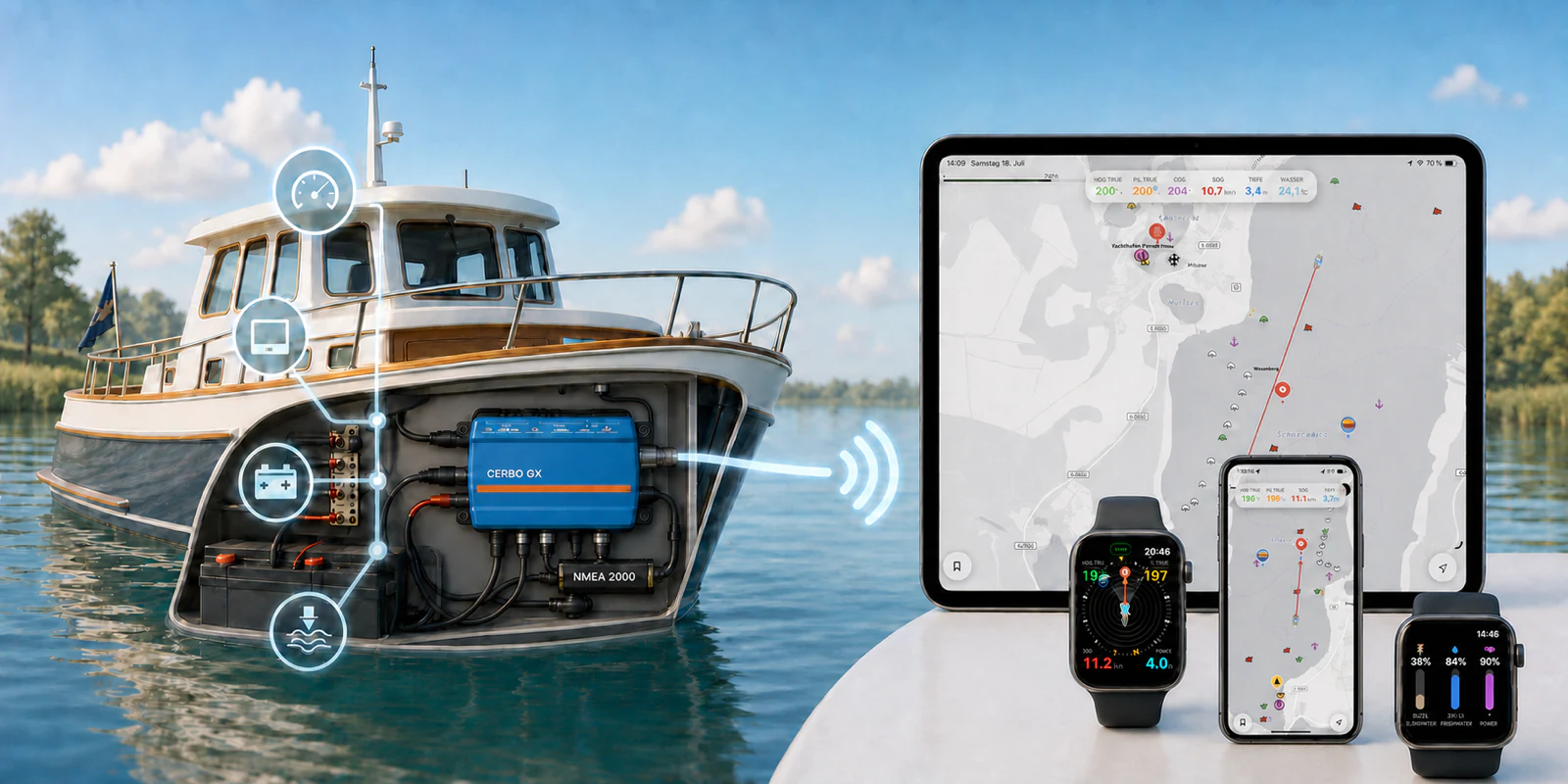
You do not need to buy every instrument twice. Signal K collects values already available on board and makes them available to several devices at the same time.
The displays you actually see depend on the sensors and systems installed on your boat.1
Rivers & Seas on iPhone, iPad, and Mac
The app can use the boat’s position, course, speed, heading, and water depth from Signal K. On the large Mac display, the map and boat data remain especially clear together.
Apple Watch
A quick glance at your wrist can show information such as battery, fresh-water, and black-water levels supplied through Signal K.
More displays and apps
KIP provides customizable instruments in a browser. Apps such as WilhelmSK and Signal K Mobile can add more displays, alarms, and controls.
Works without the internet
The connection initially stays within your boat’s Wi-Fi. Navigation data and displays therefore remain available where mobile reception is poor.
What you need on board
The setup consists of three manageable parts. If one of them is already installed, getting started becomes easier.
1. Data from the boat
For example GPS, depth sounder, compass, AIS, engine, batteries, or tanks. These values often travel over NMEA 2000; Victron equipment also uses its own data connections.
2. A Signal K hub
This is a small computer that collects and distributes the values. On many boats, the existing Victron Cerbo GX can do this job. A Raspberry Pi is the flexible alternative.
3. Boat Wi-Fi
The Signal K hub and your iPhone, iPad, or Mac must be on the same local network. An existing onboard router can provide it.
The simple route with a Cerbo GX
If you already have a Victron Cerbo GX on board, you probably already own the Signal K hub and do not need another computer. The extended “Venus OS Large” software includes Signal K and makes data from the Cerbo GX and connected Victron equipment available.
This can include battery state, voltage, current, solar yield, and other energy data.
To add NMEA 2000 navigation data, connect one of the Cerbo GX VE.Can ports to your boat’s existing NMEA 2000 network. Victron’s “VE.Can to NMEA 2000 Micro-C male cable” is made for this connection. You will not need a separate NMEA adapter at the Cerbo GX.
- Open Settings on the Cerbo GX or through Remote Console.
- Under Firmware, choose the “Large” image type and install the offered update.
- Then enable the Signal K server under Settings › Integrations › Venus OS Large features.
- Have the VE.Can port connected to the NMEA 2000 network with the Victron cable, and select a 250 kbit/s VE.Can profile on the Cerbo GX.
- Then check in Signal K that the NMEA 2000 connection over VE.Can is active. Existing values such as heading, speed, and depth can then appear in Rivers & Seas.
- Connect the Cerbo GX and your iPhone to the same boat Wi-Fi.
The flexible route with a Raspberry Pi
Without a Cerbo GX, a Raspberry Pi makes a versatile Signal K hub. For a new installation, use a Raspberry Pi 4 or 5 with a current 64-bit system, reliable power, and a good memory card or SSD.
Signal K can be installed on Raspberry Pi OS. For a complete onboard system, a prepared platform such as OpenPlotter is often easier because it already includes Signal K and other marine tools.
- Install the Raspberry Pi in a case with storage and a power supply suitable for use on board.
- Install Signal K or a prepared OpenPlotter system.
- Connect the Raspberry Pi to the boat router by Ethernet or Wi-Fi.
- Connect the boat data through a suitable electrically isolated NMEA interface.
How boat data reaches Signal K
NMEA 2000 and Victron connections are the lines through which equipment on board communicates. Signal K does not replace them—it makes their data useful to apps and browsers.
NMEA 2000
This commonly carries position, course, speed, depth, wind, AIS, and engine data. A USB interface such as the Actisense NGX-1-USB can connect the network directly to a Raspberry Pi.
NMEA 2000 over Wi-Fi
A gateway such as the Actisense W2K-1 sends many navigation values to compatible apps over Wi-Fi and can be used as a data source. Before buying, check which values and data format your planned setup needs.
Victron energy data
Inverters, chargers, solar controllers, battery monitors, and tank sensors can meet at the Cerbo GX through VE.Bus, VE.Direct, or VE.Can. Venus OS Large makes this data available to Signal K.
Older NMEA 0183 equipment
Older GPS, AIS, and depth equipment can often be retained. A suitable galvanically isolated NMEA 0183 interface is required.
Connect Rivers & Seas
Once Signal K is running, the rest is usually quick.
- Connect your iPhone or iPad to the boat’s Wi-Fi.
- Open Rivers & Seas and allow the app to find devices on the local network.
- Rivers & Seas automatically looks for a Signal K server and connects when it finds one.
- If Signal K shows an access request, approve it in the Signal K administration. Write access is only needed if you want to control your autopilot or switches with Rivers & Seas.
When course, speed, or depth appears in Rivers & Seas, the connection is working. If an individual value is missing, the relevant sensor or Signal K configuration is usually not providing it yet.
What else becomes possible
Signal K is more than an extra instrument display. Once the basic connection works, you can expand the system one step at a time.2
Data and alarms
Custom dashboards, anchor alarms, automatic logbooks, and warnings for battery, bilge, temperature, or tanks are possible with the appropriate sensors and apps.
Digital switching
Suitable relays, switching modules, and Signal K plugins can control equipment such as lights or pumps. This requires appropriate hardware and careful, safe configuration.
Remote access
Monitoring from home requires an internet connection on the boat and secured access, such as a VPN or suitable Victron VRM features. Never expose the Signal K server to the internet with a simple port-forwarding rule.
Autopilot
With a compatible autopilot, the appropriate Signal K autopilot plugin, and a bidirectional connection, Rivers & Seas can steer the course. The boat’s normal controls and safety procedures always remain essential.
Devices, apps, and further help
These pages explain the options in more detail. Before buying, it is also worth speaking to an installer familiar with NMEA 2000 and your existing marine electronics.3