Check bridge clearances beforehand
With your boat dimensions, you can recognise when a known passage is too low, narrow, or shallow.
GPX Tracks for boating and travel
Rivers & Seas shows whether your boat fits through known bridges, when you will reach each lock, whether it is expected to be open, and which EuRIS or available ELWIS notices affect the journey. On open water, you can follow the exact course of a proven passage—for example, a Track sent by a friend.

Know whether the journey works before leaving
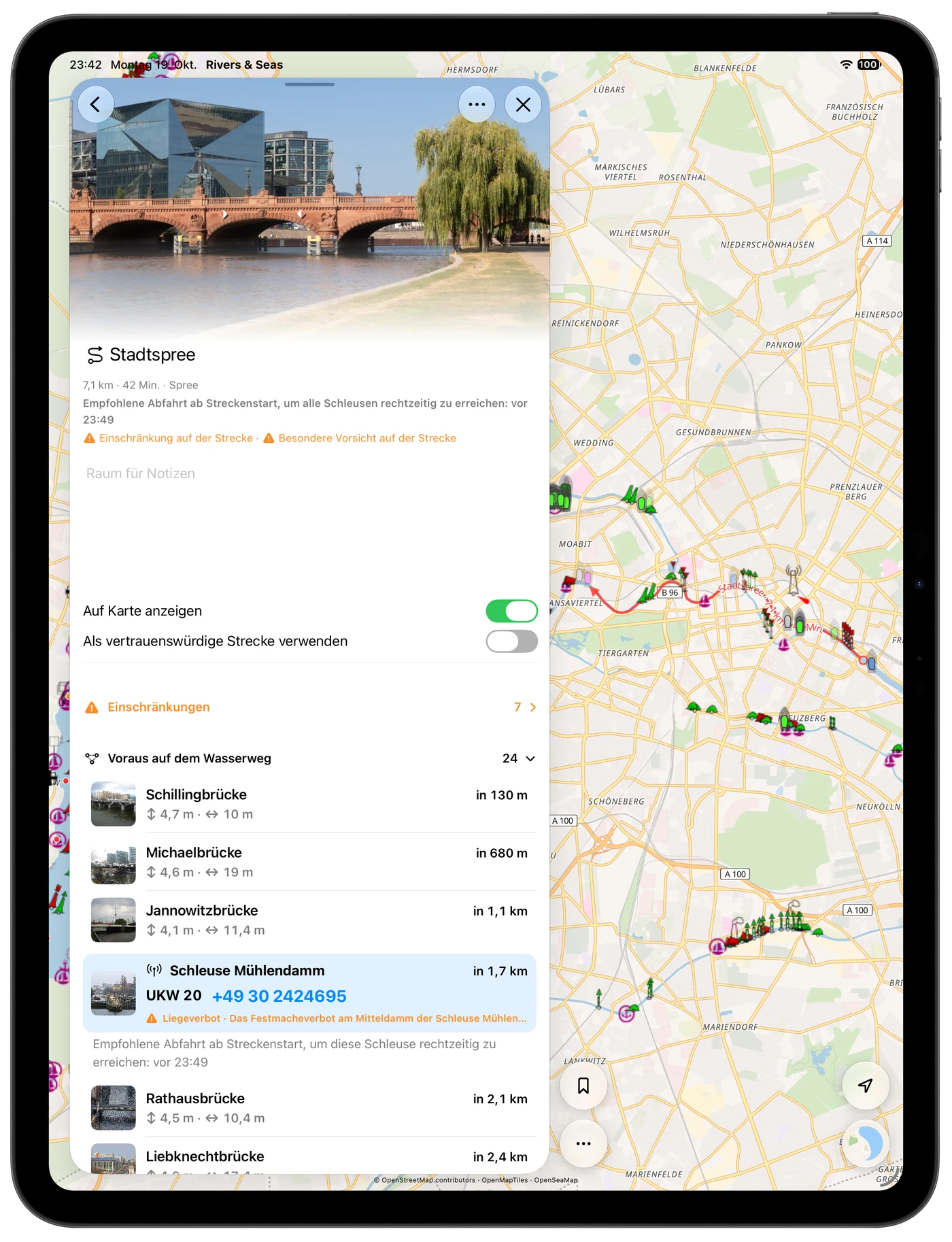
Check the important places before casting off. Rivers & Seas places available bridge clearances, lock opening times, closures, and current navigation notices along the Track and estimates when you will reach them.
GeoJSON and RNSP files can also be opened and imported.
With your boat dimensions, you can recognise when a known passage is too low, narrow, or shallow.
Distance, estimated arrival, and available opening times show whether the planned journey works.
Available EuRIS and ELWIS notices appear where closures, works, or restrictions affect your Track.
After import
Open the details, set the direction, and check the known places along the course. Rivers & Seas can also derive a useful departure window for locks and gauge- or tide-dependent bridges.
Bring a proven passage with you
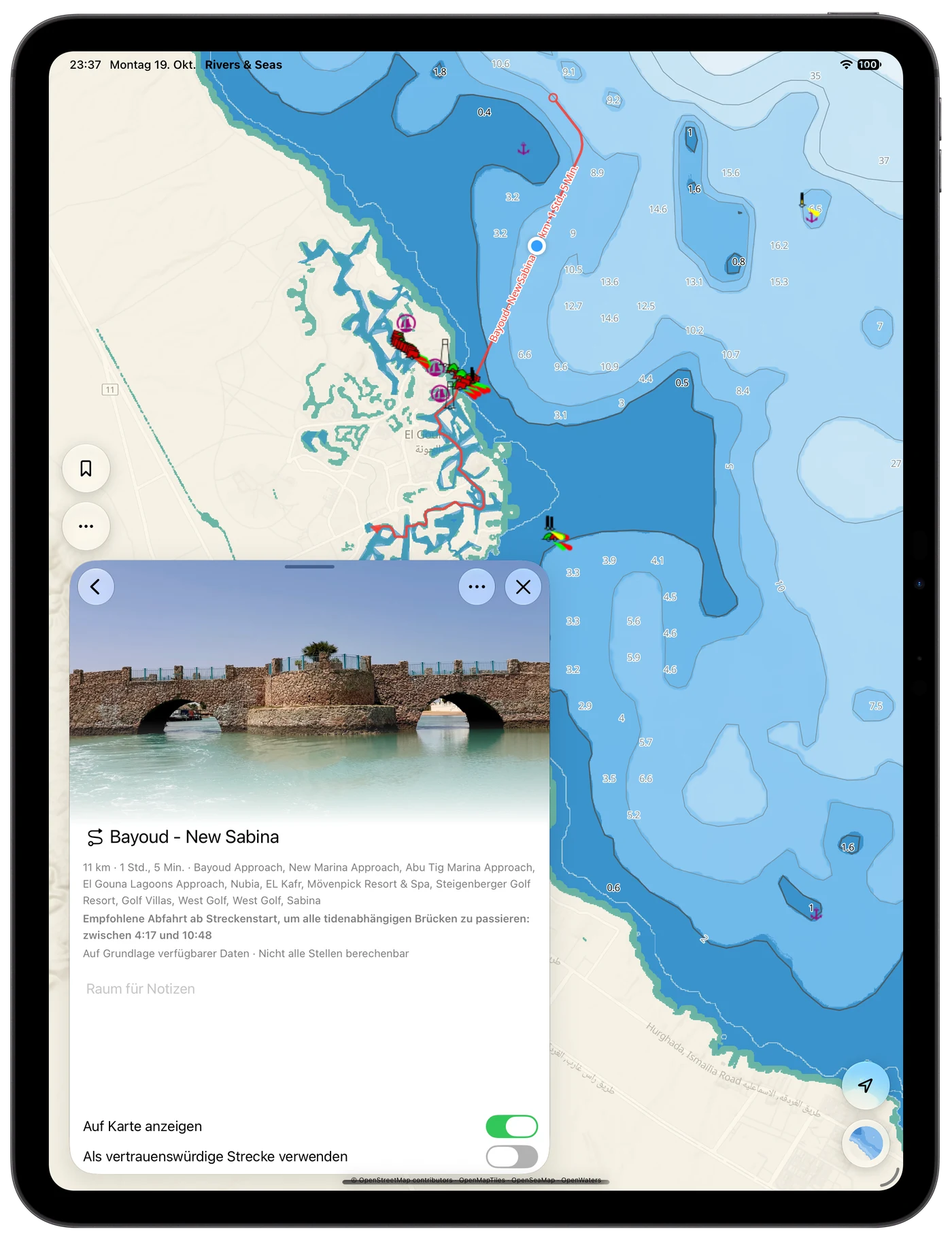
If a friend, charter company, or another skipper has already travelled a passage safely, you can bring its exact course with you. The Track remains clearly visible on your map and helps you find the proven way between shallows, islands, or narrow passages.
See the Track clearly on the map instead of rebuilding the passage from separate waypoints.
The saved course helps you locate a known route through shallow or narrow areas.
Rivers & Seas shows distance and pure cruising time. Assumed time in locks appears separately and shifts the arrival at every place that follows.
Keep favourite Tracks
Name a Track, add a photo and notes, and organise it with coloured tags. Show it only when needed, or reverse its direction for the return journey.
Map visibility is separate from pinning. Keep important Tracks without filling the map with lines.
Reverse the start, finish, and order of a Track instead of importing the same journey again.
Share a straightforward Track as GPX, use GeoJSON for geographic data, or RNSP for complete Rivers & Seas collections with places, Tracks, tags, and photos.
Optional, not required
While cruising, Rivers & Seas still recognises the waterway you actually take. A saved Track is useful when you want to preview a recommended course, prepare a day trip, or bring a favourite journey with you.
Understand boat navigation without route planningImport and export
Rivers & Seas reads and writes common formats according to their purpose. Before every import, the recognised contents appear on the map.
For Tracks and recordings, and especially useful for exchange with other navigation and outdoor apps.
For geographic points and lines when exchanging data with mapping or GIS applications.
For complete Rivers & Seas packages containing Tracks, bookmarks, tags, colours, notes, and photos.
Quick answers
Tap the file in Files and choose Rivers & Seas, drag it into the app, or send it through the Share menu. A map preview appears before import.
Yes. Rivers & Seas imports GPX tracks and GPX routes as Tracks and displays them as a clear line on the boating map.
Yes. When your boat dimensions and structure dimensions are known, you can recognise passages that are too low, narrow, or shallow. Estimated arrival already includes the duration of earlier lockages. You also see available opening times and relevant EuRIS or ELWIS notices.
A Track shows the exact course of a previously travelled passage. When a friend or charter company sends you a proven Track, you can follow it clearly on the map and find difficult passages more easily.
No. Automatic look-ahead works underway without a planned Track. Import is an additional option for recommended, prepared, or especially enjoyable journeys.
Yes. A Track can be displayed anywhere on the map. The distinctive strength of Rivers & Seas is the added context it provides on waterways.
Yes. Export one or more Tracks and pass them on as GPX, GeoJSON, or a complete RNSP package.
Check before departure
Check the passage, cruising and lock time, bridges, locks, and current notices on one map.